












.svg)
.svg)

.svg)

.svg)
.png?width=512&height=512&name=guru%20(1).png)
.svg)


.png?width=199&height=109&name=salesforce-logo1-removebg-preview%20(1).png)




.svg)

.svg)
.svg)


.webp?width=716&height=569&name=banner-img%20(1).webp)


A no-show is a revenue leak with a predictable cause: people simply forget.
SMS appointment reminders fix that because texts get read fast and let the person confirm or reschedule in the same thread. This guide covers the timing sequence that actually works, copy-paste templates for every step of the appointment, and how to handle the reply that isn't a simple yes.
What Are SMS Appointment Reminders?
SMS appointment reminders are automated text messages sent before a scheduled appointment that confirm the details, let the person reply to confirm or reschedule, and cut no-shows. They are sent from a registered business number, with the recipient's consent, and the best ones are two-way: the person can text back can we do Thursday? and get rescheduled without calling anyone.
The distinction that matters: a reminder that only pushes information out is doing half the job. A reminder people can reply to, and that does something useful with the reply, is doing all of it. If you are setting up reminders from scratch, start with the appointment engine itself. See how appointment scheduling works when the reminders and the booking live in the same system.
Do Text Reminders Actually Work?
Yes, and the evidence is unusually clean for a marketing claim. A Cochrane systematic review of eight randomized controlled trials found that text message reminders increase attendance at appointments compared to no reminder and to postal reminders. Across the pooled data, attendance was 67.8% with no reminder and 78.6% with a text reminder. Text reminders performed about as well as phone-call reminders, at lower cost.
Two practical takeaways from that finding. First, the lift is real and consistent, not a vendor stat. Second, cost matters: a text costs a fraction of a staff phone call and reaches people who would never pick up an unknown number. That combination is why texting has become the default reminder channel for appointment-run businesses.
The Reminder Sequence That Works (Timing)
There is no single right time to send a reminder. There is a right sequence. One reminder underperforms because it has to do too many jobs at once: confirm the booking, jog the memory, and catch a last-minute conflict. Spread across the sequence below, each message does one job well.
|
Touch |
Timing |
Job it does |
|---|---|---|
|
Booking confirmation |
Immediately at booking |
Confirms the appointment is real and logged, and sets the number the reminders will come from. |
|
Main reminder |
24 to 48 hours before |
Gives the person enough time to reschedule if life got in the way, without forgetting again before the appointment. |
|
Day-of nudge |
2 to 3 hours before |
Catches the person who confirmed days ago and still needs the address, time, or a quick heads-up. |
Adjust to your booking lead time. If someone books an appointment for tomorrow, collapse the sequence: a booking confirmation and a day-of nudge is plenty. If they book three weeks out, the 24-to-48-hour reminder is doing the heavy lifting, because by then the appointment has fallen out of working memory. The one pattern to avoid is the single-reminder setup some guides recommend. The evidence favors a light multi-touch cadence, and the touches are cheap.
The Full Appointment Loop (With Templates)
Cutting no-shows is not one message. It is a loop: confirm at booking, remind on schedule, handle the reply, recover the no-show, and rebook. Most reminder guides cover the middle and go quiet on the ends, which is exactly where the appointments leak. Templates below are written as real text you can paste and edit. Keep them short, sign with the business name, and always give an opt-out on the first message.
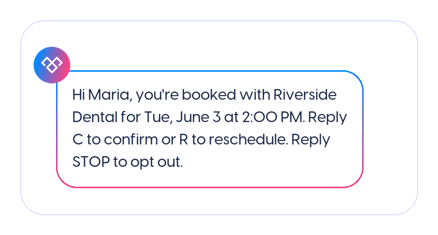
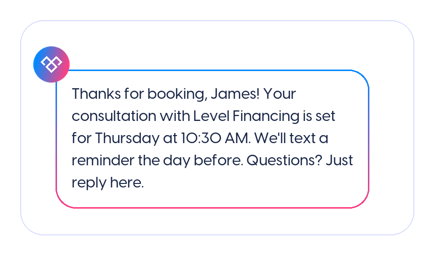
1. The booking confirmation
Sent the second the appointment is booked. It confirms the slot, sets the number future reminders will come from, and quietly opens the two-way thread.
2. The reminder
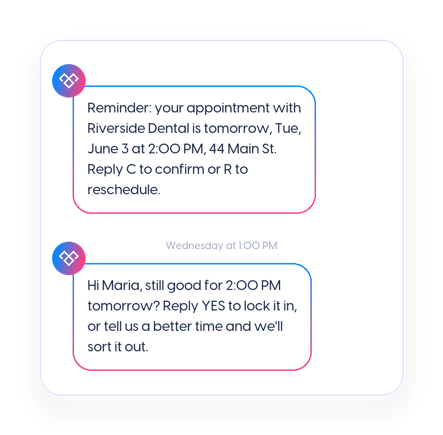
Sent 24 to 48 hours out. This is the workhorse. Include the one detail people most often forget, usually the time or the location, and make replying effortless.
3. Handling the reply (the test)
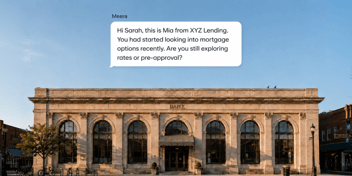
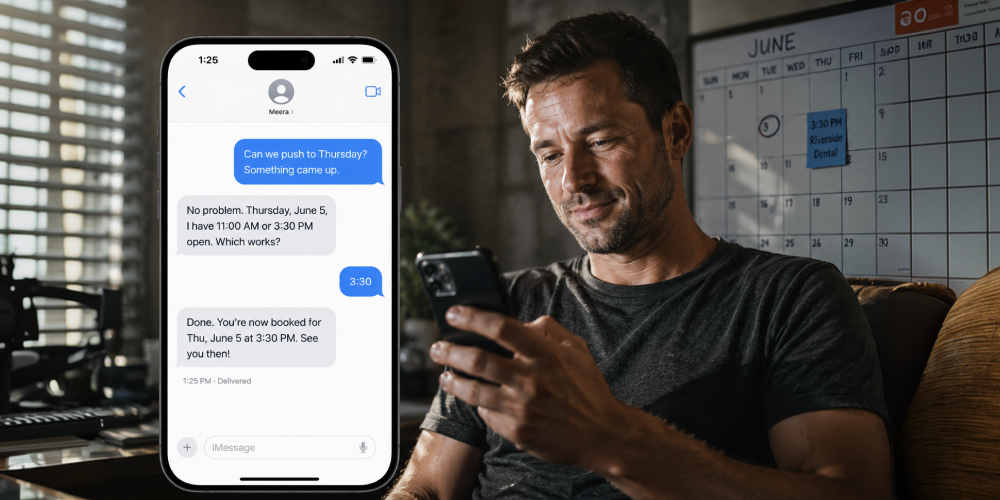
YES is easy. Any reminder system can log a YES. The test is the reply that isn't: can we do Thursday instead?, is there parking?, what do I need to bring?. A one-way reminder drops these on the floor, and the person, now slightly annoyed, no-shows. Two-way texting that can reschedule inside the thread is what closes the gap.
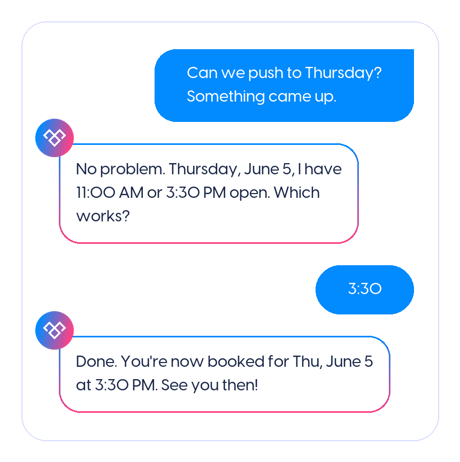
That exchange is a worked example of automated two-way texting: a lead texts back in plain language, and the system reads the intent, offers real open slots from the calendar, and rebooks without a human touching it. It is the same pattern lending team Level Financing used to contact new leads within 15 seconds and move them toward booked calls.
4. Day-of and running-late messages
The day-of nudge catches the person who confirmed days ago and forgot again. Keep it to the essentials: time, place, and how to reach you if they are stuck.
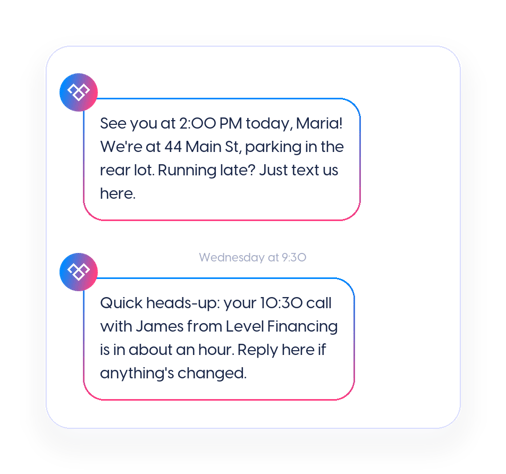
See you at 2:00 PM today, Maria! We're at 44 Main St, parking in the rear lot. Running late? Just text us here.
Quick heads-up: your 10:30 call with James from Level Financing is in about an hour. Reply here if anything's changed.
5. No-show recovery and rebooking
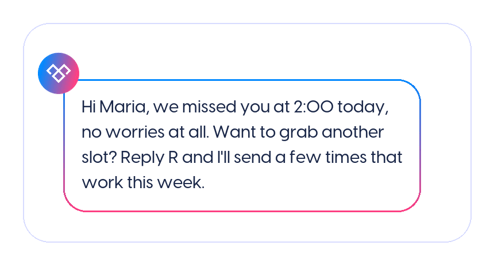
This is the step almost no reminder guide covers, and it is where the recovered revenue is. A missed appointment is not a lost customer unless you treat it like one. Reach out the same day, assume good faith, and make rebooking a single reply. For sales meetings specifically, the recovery message can name the reason the meeting mattered. (Meera's guide on reducing no-shows for sales meetings covers that variant.)
6. The review and rebook follow-up
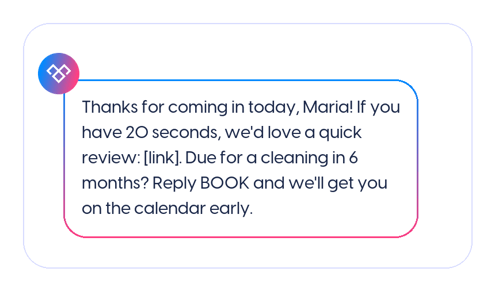
After a completed appointment, one message closes the loop and opens the next one: a thank-you, a light ask for a review, and an easy path back if they need to return.
Setting It Up: Manual, Scheduled, or Automated
There is a spectrum here, and where you land depends on volume and how much of the reply you want handled for you.
- Texting from a personal phone. Fine for a handful of appointments a week, until it isn't. There is no opt-out handling, no record, no scheduling, and the number is yours forever. Skip it the moment you are past a dozen reminders a week.
- Scheduled one-way sends. A tool fires a reminder at a set time before each appointment. Better than nothing, and it covers the confirm-and-remind steps. It goes quiet the moment someone replies with anything other than a keyword.
- Automated two-way texting. Connected to your calendar or CRM, this confirms, answers the common questions, reschedules inside the thread, and books, handling the reply that isn't YES. This is the version that closes the full loop above.
Most businesses graduate up this list as volume grows. The jump that changes the no-show numbers is the last one, because it is the only setup that handles the reschedule request in the moment instead of dropping it.
Consent and Compliance Basics
A useful distinction the generic guides tend to blur: appointment reminders to an existing customer are generally informational or transactional messages, not promotional ones, and the two are treated differently under U.S. texting rules. A reminder about an appointment the person booked is not the same as a marketing blast, though you still need the basics right. At a capability level, that means:
- Get consent when the appointment is booked, and keep a record of it.
- Honor opt-outs automatically. STOP means stop, immediately and permanently.
- Send within reasonable business hours in the recipient's time zone.
- Register your business number for 10DLC if you are texting from a standard number at any volume, so carriers deliver your messages instead of filtering them.
Rules change and specifics vary by industry and jurisdiction, so treat this as orientation rather than legal advice, and confirm your setup against current guidance before you launch at scale.
Reminders by Industry (Briefly)
Healthcare. The channel patients prefer, and the setting with the strongest attendance evidence. Handle protected health information carefully: confirm details without exposing diagnoses or reasons for the visit in the message body.
Salons and wellness. High-frequency, short-lead bookings where a same-day nudge and easy rebooking recover the most revenue. The reschedule-in-thread reply is the whole game here.
Home services. Arrival windows are the pain point. A day-of message with a tightened window and a running-late reply path cuts the missed-visit rate.
Professional services. Consultations and reviews booked well in advance, where the 24-to-48-hour reminder does most of the work of getting people in the door.
Sales teams. Demos and discovery calls, where speed to the booked slot and no-show recovery move pipeline directly. Level Financing books qualified leads straight onto the calendar this way.
Frequently Asked Questions
What should an appointment reminder text say?
The date, the time, the location, the business name, and a way to confirm or reschedule in one reply. Keep it under a couple of lines. Everything past that is noise that makes the useful part harder to find.
How many reminders should I send, and when?
A booking confirmation right away, a main reminder 24 to 48 hours out, and a day-of nudge two to three hours before. Collapse the sequence for same-day bookings. One reminder underperforms because it has to do three jobs at once.
Do customers need to opt in to reminder texts?
You need consent, which you can capture at booking. Reminders about an appointment the person scheduled are generally treated as informational rather than promotional, but you still keep a record of consent and honor opt-outs. Confirm the specifics for your industry.
Do text reminders actually reduce no-shows?
Yes. A Cochrane review of eight randomized trials found text reminders raised attendance from 67.8% with no reminder to 78.6%, matching phone-call reminders at lower cost.
Can customers reschedule by replying to a reminder?
With a one-way reminder, no. With automated two-way texting connected to your calendar, yes: the person texts back a better time in plain language and the system offers real open slots and rebooks in the thread.
About the Author