
What is a Webhook?
A webhook is a mechanism for sending data from one system or application to another when a specific event occurs. It allows for real-time communication between different platforms over the web. By pushing this data to an external third party, a webhook call can notify any external platform when new data is available, when a specific status changes, or when an action occurs.
Webhook Flow Overview
-
Register your Webhook URL
Simply give us your CRM's webhook URL, and Meera.ai will forward the data to it.
-
Event Occurs
When a lead progresses to a new status as they move through the Campaign, Meera AI triggers a webhook call in real-time!
-
Data Sent via HTTP POST
Meera AI sends an HTTP POST request to the target webhook URL. This request contains a JSON payload with all the relevant data about the lead and its status.
- CRM Processes the Data
The CRM platform receives the data and processes it accordingly.
Setting up a New Webhook
-
Edit Your Campaign
-
While logged into the Meera Dashboard, click on Campaigns in the left sidebar, then select the pencil icon next to the desired Campaign that you want to receive lead updates for.
-
-
Access your Webhooks Configuration
-
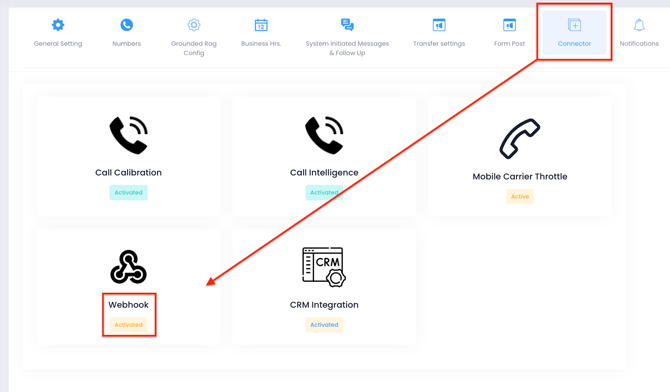
Click on Connector then Webhook
-
- Add a New Webhook
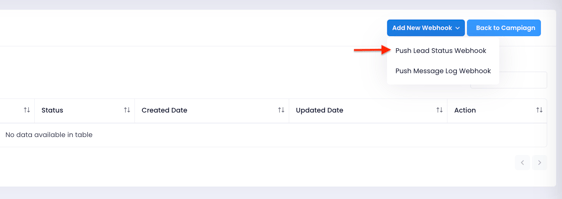
- From the Add New Webhook dropdown, select Push Lead Status Webhook.
- Configure your Webhook
-
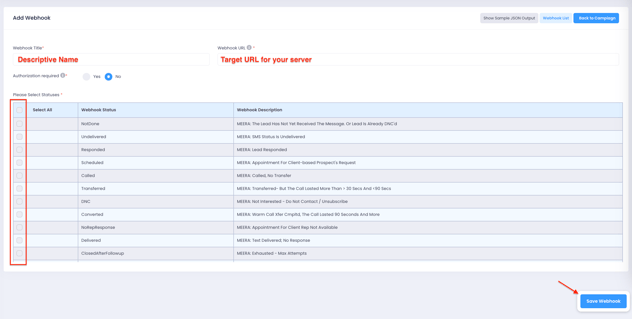
Enter a descriptive name of your choice for your webhook
-
Enter the URL for your CRM (or whichever target platform server)
-
Optional: if your target server requires some form of Authentication, select Yes and configure the options accordingly
-
-
-
Select the specific statuses that you want to trigger the webhook callback (or simply Select All at the top). Scroll down to see all options. Refer to the link below for more info!
-
Click on Save Webhook
-
Further Reading
To learn more about webhooks and lead status notifications, check out our guide: Webhooks: Understanding Lead Details & Status. Please also refer to our API Documentation
Still Need Help?
If you need assistance setting up your webhook URL, decoding the payload, or understanding how to map this data into your system, our team is happy to help.Reach out at help@meera.ai