
How the Call Transfer Works
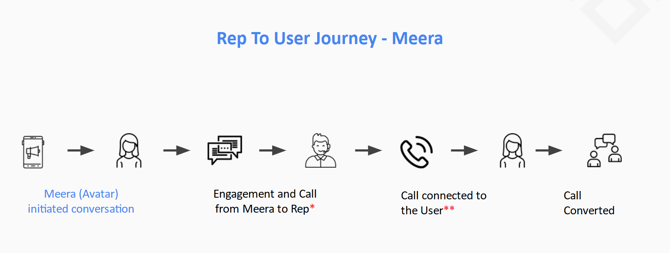
In the rep to user flow, Meera calls the representative first to confirm they are available, then dials the lead to connect both parties.
When a transfer is initiated, the following happens:
- Meera places a call to the representative.
- When the representative answers, they hear a whisper. For example: "Incoming call from [FirstName] [LastName]. Press any key to connect to your prospect."
- The representative presses any key to confirm they are ready.
- Meera dials the lead.
- When the lead answers, they hear a prompt — for example: "Hi [FirstName], this is [CompanyName]. Press any key to connect with the representative".
- Meera connects both parties.
Best Practices
Treat every call as outbound, not inbound.
-
Since this flow simulates an outbound call, the opening should make it clear to the lead that it is an outbound interaction. Greet the lead using their name and reference the program or offer. For example:
"Hi [FirstName], thanks for taking the time to chat today! I look forward to helping you with [program/offer name]. Before we start, can you please spell your full name to ensure I have it correct?" Then continue with your outbound script.
- Avoid inbound-style greetings such as: "Thank you for calling [CompanyName]. This is [Rep Name] — how can I help you today?"
Key Terms
-
Rep Whisper: Heard by the representative when they answer the call. Identifies the lead and helps the representative locate their details before the call connects. Also filters out voicemail. Whisper text is fully customizable.
-
User Whisper: Heard by the lead when they answer the call. Informs the lead of the origin of the call. This whisper can be disabled or customized.
-
Avatar Name: The name of the virtual agent used to introduce your company to the lead via Meera's text messaging campaign. For example: "Hi John, this is Mia from ABC Institute..." — in this case, "Mia" is the avatar name. Representatives should be familiar with the campaign's avatar name, as the lead may ask for this person during the call. If this happens, the best practice is to explain that it is the scheduling assistant.
-
Caller ID: In the rep to user flow, the representative will see the Meera campaign number as the caller ID. However, the rep whisper script can be customized to include the lead's name and phone number before the call connects.
Frequently Asked Questions
Why does Meera call the rep before dialling the lead?
This ensures your representatives are available and ready before the lead is connected, preventing leads from being placed on hold or reaching an unanswered line.
Do I have to press a key?
Yes, pressing a key is required to confirm you are available. If no key is pressed, Meera will not proceed to dial the lead.
Why might the lead mention a name like "Mia" or another agent?
Meera uses a virtual agent, known as an avatar, to introduce your company to the lead via text messages before the call. The lead may be familiar with this name and reference it during the call. If the lead asks to speak to the avatar, explain that it is the scheduling assistant and continue the conversation.
Can I customize the whisper prompts?
Yes, both the rep whisper and the customer whisper are fully customizable. Contact your CSM to make changes to the whisper text.
If you have any additional questions please send us a quick email to help@meera.ai. We're happy to help!